Gemma 3 is Googles latest advancement in large language models (LLMs), designed to deliver high performance across various tasks while maintaining efficiency. Developed by Googles AI research team, Gemma 3 introduces significant enhancements over its predecessors, focusing on multimodal capabilities, extended context handling, and multilingual support.

One of the standout features of Gemma 3 is its multimodal capability, allowing it to process and understand both text and images. This is achieved through the integration of the SigLIP vision encoder, enabling the model to analyze visual content at resolutions up to 896 pixels. This functionality facilitates tasks such as image description, object identification, and answering questions related to visual data.
Gemma 3 also boasts an extended context window, capable of handling up to 128,000 tokens. This substantial increase allows the model to process lengthy documents, books, or extended conversations without losing coherence. The architecture employs a combination of local and global attention mechanisms, optimizing memory usage and maintaining performance over long sequences.
In terms of multilingual support, Gemma 3 is trained on over 140 languages, with native support for 35. This extensive language coverage ensures effective communication and understanding across diverse linguistic contexts. Enhanced tokenization techniques, particularly for complex scripts like Chinese, Japanese, and Korean, improve processing accuracy and efficiency.
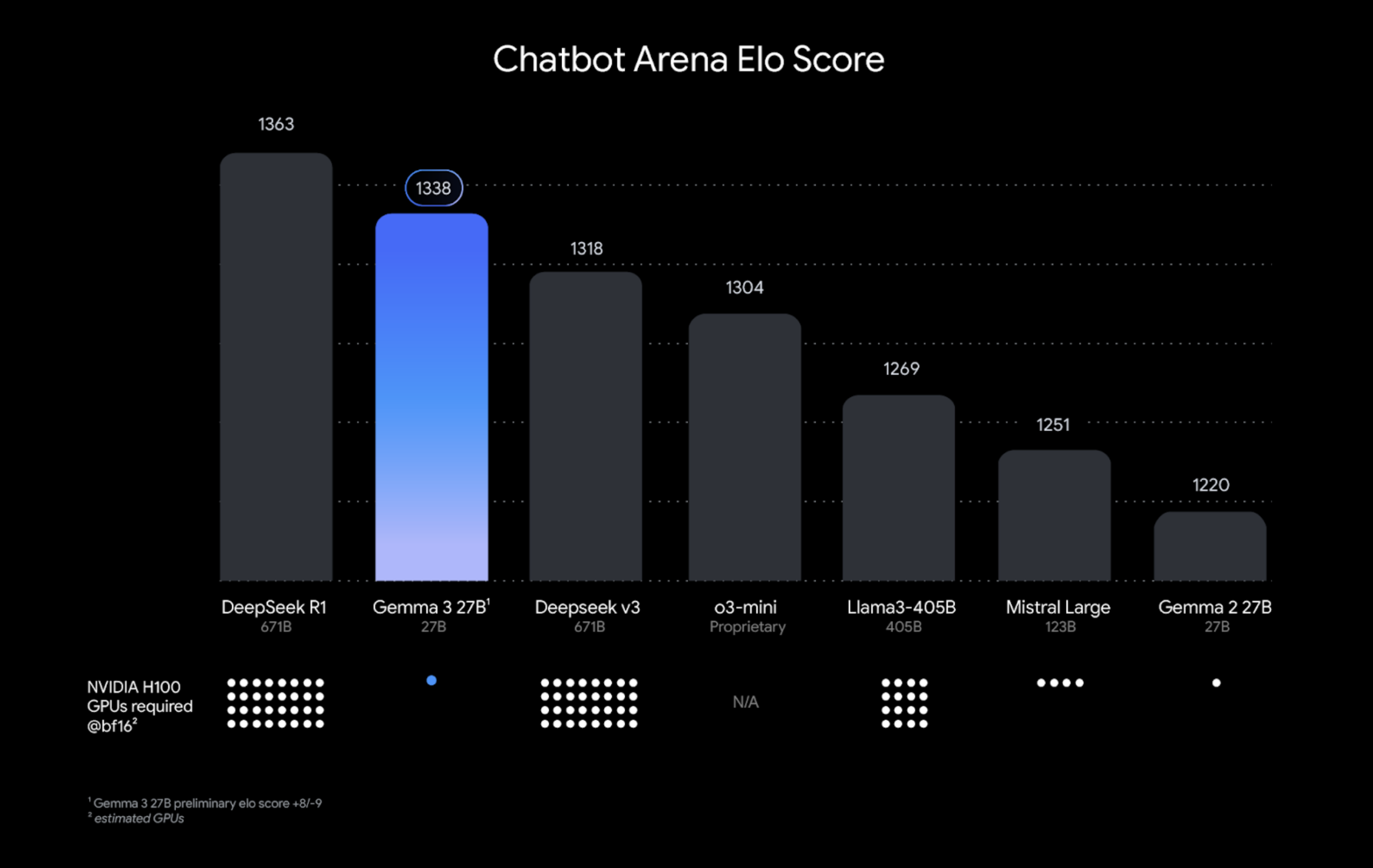
Efficiency is another hallmark of Gemma 3. The model is optimized to run on a single GPU, making advanced AI capabilities more accessible without the need for extensive computational resources. Quantized versions of the model offer significant memory savings, with the 27B parameter model requiring only 14.1GB in Int4 quantization, compared to 54GB in BF16.
Performance benchmarks highlight Gemma 3s competitive edge. In the MMLU-Pro benchmark, the 27B parameter model achieved a score of 67.5%, surpassing larger models like Llama-2-70B (65.2%) and GPT-3.5 (~62.5%). This indicates a high level of parameter efficiency, delivering strong performance with fewer resources.
In summary, Gemma 3 represents a significant step forward in LLM development, combining multimodal processing, extended context handling, multilingual proficiency, and efficient deployment. These features position it as a versatile and accessible tool for a wide range of applications.
When comparing Gemma 3 to other similar LLMs, it demonstrates notable strengths in efficiency and performance. The following table provides a comparison of Gemma 3 with other prominent models based on the MMLU-Pro benchmark:
| Model | Parameter Size | MMLU-Pro Score |
|---|---|---|
| GPT-4 | Not disclosed | 79.3% |
| GPT-3.5 | ~175B | 62.5% |
| Llama-2-70B | 70B | 65.2% |
| Gemma 3 27B | 27B | 67.5% |
This comparison underscores Gemma 3s ability to outperform larger models in terms of parameter efficiency and benchmark performance, making it a compelling choice for various AI applications.
For a visual representation of Gemma 3s capabilities, refer to the following images:

Usage License
Gemma 3 is provided with an open weights architecture, allowing users to access and utilize the models capabilities. However, its usage is governed by specific licensing terms that vary based on the intended application:
- Academic Use: Researchers and educational institutions can use Gemma 3 for non-commercial research and educational purposes.
- Personal Use: Individuals may utilize the model for personal projects and learning experiences.
- Commercial Use: Businesses intending to integrate Gemma 3 into commercial products or services must adhere to the commercial licensing terms.
Users are required to:
- Use the model in compliance with applicable laws and regulations.
- Avoid using the model for illegal, harmful, or offensive purposes.
- Respect the intellectual property rights associated with Gemma 3.
Additionally, Google reserves the right to restrict usage that violates the companys prohibited use policy or applicable laws.
For detailed information on licensing options and terms, please review the official Terms of Use.
Advantages and Disadvantages of Running Gemma 3 Locally
Running Gemma 3 on local hardware offers several benefits and drawbacks:
Advantages
- Privacy: Processing data locally ensures that sensitive information remains within your control, reducing exposure to external servers.
- Offline Operation: Gemma 3 can function without an internet connection, enabling continuous operation in environments with limited or no connectivity.
- Portability: The models efficiency allows it to run on laptops, providing flexibility to work without a constant power supply.
- Reduced Latency: Local processing can lead to faster response times, as data doesnt need to travel to and from external servers.
- Cost Efficiency: By utilizing existing hardware, users can avoid expenses associated with cloud-based services.
Disadvantages
- Hardware Requirements: While Gemma 3 is optimized for single-GPU operation, running larger models may still require substantial computational resources.
- Maintenance: Users are responsible for software updates, security patches, and system upkeep.
- Scalability Limitations: Local setups may struggle to handle large-scale tasks compared to cloud infrastructures.
- Energy Consumption: Continuous operation of high-performance hardware can lead to increased energy usage.
Considering these factors is essential when deciding whether to deploy Gemma 3 locally or utilize cloud-based solutions.
 Run gemma3 with Ollama
Run the gemma3 model locally with Ollama to work in private, offline and with low latency. Model page: gemma3 on Ollama.
 Install Ollama on Windows and run gemma3
- Install Ollama with Winget:
winget install Ollama.Ollama
- Open PowerShell or Terminal and run the model:
ollama run gemma3
Compatible with Windows 10 and Windows 11. Ideal for professional desktops, content creation, and local workflows without internet.
 Install Ollama on MacOS and run gemma3
- Install Ollama with Homebrew (Intel or Apple Silicon):
brew install ollama
- Run the model:
ollama run gemma3
On macOS Monterey, Ventura and Sonoma, gemma3 performs very well on Apple Silicon (M1/M2/M3) for writing, development and study totally offline.
 Linux: install Ollama and run gemma3
Install the LLM gemma3 on Ubuntu, Debian, Fedora, Kali Linux, openSUSE, Linux Mint, Pop!_OS, Arch and Manjaro with a single command:
curl -fsSL [https://ollama.com/install.sh](https://ollama.com/install.sh) sh
- Run the model on your distro (Ubuntu/Debian/Fedora/Kali/openSUSE/Mint/Pop!_OS/Arch/Manjaro):
ollama run gemma3
Perfect for Linux servers and laptops: automate workflows with scripts, draft content and test prompts without relying on the internet.
 BSD (FreeBSD, OpenBSD, NetBSD): run gemma3 with Ollama in a container
The simplest way on BSD is to use a container (Docker/Podman) to isolate the environment:
docker run -d --name ollama -p 11434:11434 -v ollama:/root/.ollama ollama/ollama docker exec -it ollama ollama run gemma3
Valid for FreeBSD, OpenBSD and NetBSD in labs and security environments with local AI.
How to remove the model in Ollama
ollama rm gemma3
Delete the model files to free up disk space when you no longer need it.
Available models and tags
- Model name: gemma3
- Tags (Model):
gemma3:latest gemma3:270m gemma3:1b gemma3:4b gemma3:12b gemma3:27b
 Run gemma3 in LM Studio
LM Studio offers a graphical interface to download and run local models. Download the app according to your system from the official website: LM Studio (official download). Then search for gemma3, download and click Run.
Install LM Studio on Windows and run gemma3
- Download LM Studio for Windows from lmstudio.ai and install it (compatible with Windows 10 and Windows 11).
- In Models, search for gemma3 and click Download.
- Start the model with Run to chat locally without connection.
LM Studio on Windows simplifies model management and private sessions for productivity tasks, technical blogging, and prompt testing.
Install LM Studio on MacOS to run gemma3
- Download LM Studio for macOS from lmstudio.ai (Intel or Apple Silicon).
- Open the app, search for gemma3, download and click Run.
Smooth experience on Monterey, Ventura and Sonoma, with outstanding performance on Apple Silicon chips for creative and technical work without internet.
Install LM Studio on Linux and run gemma3
- Download LM Studio (AppImage/package) from lmstudio.ai and follow the instructions for your distro.
- Open the app, search for gemma3, download and click Run.
Works on Ubuntu, Debian, Fedora, Kali Linux, openSUSE, Linux Mint, Pop!_OS, Arch and Manjaro, enabling local and private AI sessions for desktops and workstations.
Install LM Studio on BSD and its variants to run gemma3
Run LM Studio via compatibility or a container. Once inside the app, search for gemma3, download and click Run to start the local session.
In FreeBSD, OpenBSD and NetBSD, it is a practical approach for labs and audits where local AI is a requirement.
How to delete the model in LM Studio
- Go to Models > Installed.
- Find gemma3 and click Delete to remove the downloaded files.
Hardware Required to Run the LLM Gemma3
| Model Version | Required Memory | Optimal Memory | Compatible GPUs | CPU RAM Alternative |
|---|---|---|---|---|
| gemma3:270m | 1 GB | 2 GB | NVIDIA GTX 1050 Ti (4 GB VRAM) | Yes, with 8 GB RAM |
| gemma3:1b | 4 GB | 8 GB | NVIDIA GTX 1650 (4 GB VRAM) | Yes, with 16 GB RAM |
| gemma3:4b | 16 GB | 24 GB | NVIDIA RTX 3060 (12 GB VRAM) | Yes, with 32 GB RAM |
| gemma3:12b | 48 GB | 64 GB | NVIDIA RTX 3090 (24 GB VRAM) | No |
| gemma3:27b | 108 GB | 128 GB | Dual NVIDIA RTX 3090 (24 GB VRAM each) | No |
Understanding Quantization in LLMs
Quantization is a technique used to reduce the memory and computational requirements of large language models (LLMs) by converting their weights and activations from high-precision formats, such as 32-bit floating-point (FP32), to lower-precision formats like 8-bit integers (INT8) or even 4-bit integers (INT4). This process significantly decreases the models size and speeds up inference, making it feasible to run LLMs on hardware with limited resources.
For instance, a model that originally requires 16 GB of memory can be compressed to just 4.5 GB through quantization, allowing it to be used on devices with limited resources, including those with a single CPU.
Optimal Setup for Running Gemma3 Models Locally
To run the various versions of the Gemma3 model locally, the following setups are recommended:
- gemma3:270m: A system with at least 8 GB of RAM and a GPU with 4 GB VRAM, such as the NVIDIA GTX 1050 Ti.
- gemma3:1b: A system with at least 16 GB of RAM and a GPU with 4 GB VRAM, such as the NVIDIA GTX 1650.
- gemma3:4b: A system with at least 32 GB of RAM and a GPU with 12 GB VRAM, such as the NVIDIA RTX 3060.
- gemma3:12b: A system with at least 64 GB of RAM and a GPU with 24 GB VRAM, such as the NVIDIA RTX 3090.
- gemma3:27b: A system with at least 128 GB of RAM and dual GPUs with 24 GB VRAM each, such as dual NVIDIA RTX 3090s.
Minimum Cost-Effective Setup
For users seeking a budget-friendly setup to run smaller versions of the Gemma3 model, the following configuration is suggested:
- Processor: Intel Core i5 or AMD Ryzen 5
- Memory: 16 GB RAM
- GPU: NVIDIA GTX 1650 with 4 GB VRAM
- Storage: 512 GB SSD
This setup should be sufficient to run the gemma3:1b model efficiently.
Potential Applications of Gemma3 Models
The Gemma3 models can be utilized for a variety of applications, including:
- Natural Language Understanding: Enhancing chatbots and virtual assistants to comprehend and respond to user queries more effectively.
- Content Generation: Assisting in drafting articles, blogs, and other written content by generating human-like text.
- Language Translation: Providing accurate translations between different languages.
- Sentiment Analysis: Analyzing customer feedback to determine sentiments and improve services.
- Code Generation: Assisting developers by generating code snippets based on natural language descriptions.
By leveraging quantization techniques, these models can be deployed efficiently across various platforms, making advanced language processing capabilities more accessible.


Be the first to leave a comment