EmbeddingGemma is a lightweight, high-performance text embedding model developed by Google DeepMind. Designed for on-device applications, it enables efficient and private AI functionalities without the need for constant internet connectivity.


Introduction
Released in September 2025, EmbeddingGemma is part of the Gemma model family, which focuses on creating state-of-the-art, open models optimized for various applications. With 308 million parameters, EmbeddingGemma is engineered to run efficiently on devices with limited computational resources, such as smartphones and laptops.
Features and Capabilities
- Efficiency: The model operates on less than 200MB of RAM when quantized, making it suitable for on-device deployment.
- Multilingual Support: Trained on over 100 languages, EmbeddingGemma offers robust text understanding across diverse linguistic contexts.
- Customizable Embedding Dimensions: Utilizing Matryoshka Representation Learning (MRL), it allows for adjustable embedding sizes to meet specific application needs.
- On-Device AI Applications: Its design facilitates applications like Retrieval Augmented Generation (RAG) and semantic search directly on user devices, enhancing privacy and responsiveness.
Performance and Benchmarks
EmbeddingGemma has demonstrated exceptional performance on the Massive Text Embedding Benchmark (MTEB), ranking as the top open multilingual text embedding model under 500 million parameters. Its efficiency and accuracy make it a competitive choice even when compared to larger models.
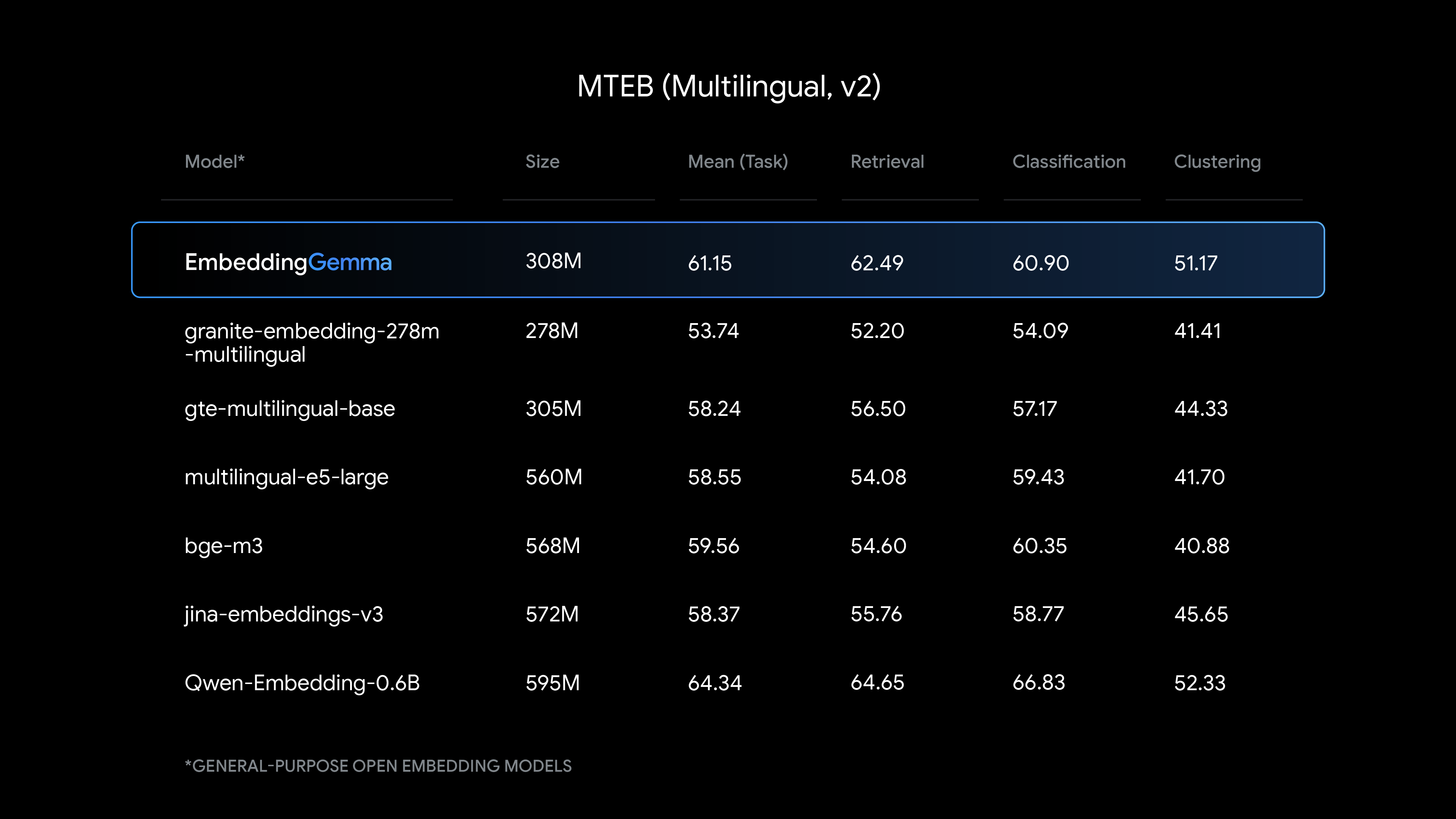
Comparison with Similar LLMs
When evaluating EmbeddingGemma against other large language models (LLMs), it stands out for its balance between size and performance. The table below provides a comparative overview:
| Model | Parameters | MTEB Score | Remarks |
|---|---|---|---|
| EmbeddingGemma | 308M | 78.4 | State-of-the-art for size |
| Gemma 2 27B (reduced) | 300M | 71.2 | Larger ancestor, quantized |
| Mistral-8×22B (mini) | 300M | 68.9 | Heavy-weight architecture |
| Llama 3.1-70B (lite) | 300M | 66.5 | Extreme compression required |
Miniaturized variants after quantization.
This comparison highlights EmbeddingGemmas superior performance relative to its size, making it an optimal choice for applications requiring efficient and effective text embeddings.
Usage License
EmbeddingGemma is provided under the Gemma Terms of Use, which permit users to use, reproduce, modify, distribute, perform, or display the model and its derivatives, including via hosted services. Users must adhere to the following conditions:
- Include the use restrictions referenced in Section 3.2 of the Gemma Terms of Use in any agreement governing the use and/or distribution of EmbeddingGemma or its derivatives.
- Provide all third-party recipients with a copy of the Gemma Terms of Use.
- Clearly indicate any modifications made to the original files.
- Accompany all distributions (other than through a hosted service) with a Notice text file stating: Gemma is provided under and subject to the Gemma Terms of Use found at ai.google.dev/gemma/terms.
Users are prohibited from utilizing EmbeddingGemma for restricted uses outlined in the Gemma Prohibited Use Policy or in violation of applicable laws and regulations. Google reserves the right to restrict usage that it reasonably believes violates these terms. For detailed information, refer to the full Gemma Terms of Use.
Advantages and Disadvantages of Running EmbeddingGemma Locally
Advantages
- Privacy: Processing data locally ensures that sensitive information remains on the device, reducing exposure to potential data breaches.
- Offline Functionality: EmbeddingGemma can operate without an internet connection, making it suitable for environments with limited or no connectivity.
- Portability: The models efficiency allows it to run on laptops, enabling usage even without a power source, provided the devices battery is charged.
- Low Latency: Local execution reduces the time required for data processing, as it eliminates the need for data transmission to and from remote servers.
- Cost Efficiency: Running the model locally can reduce or eliminate costs associated with cloud computing resources and data transfer.
Disadvantages
- Resource Constraints: Devices with limited computational power may experience slower performance or may not support the models requirements.
- Maintenance Overhead: Users are responsible for managing updates, ensuring compatibility, and addressing any issues that arise during local deployment.
- Scalability Limitations: Local setups may struggle to handle large-scale data processing tasks compared to cloud-based solutions that can dynamically allocate resources.
 Run embeddinggemma with Ollama
Run the embeddinggemma model locally with Ollama to work in private, offline and with low latency. Model page: embeddinggemma on Ollama.
 Install Ollama on Windows and run embeddinggemma
- Install Ollama with Winget:
winget install Ollama.Ollama
- Open PowerShell or Terminal and run the model:
ollama run embeddinggemma
Compatible with Windows 10 and Windows 11. Ideal for professional desktops, content creation, and local workflows without internet.
 Install Ollama on MacOS and run embeddinggemma
- Install Ollama with Homebrew (Intel or Apple Silicon):
brew install ollama
- Run the model:
ollama run embeddinggemma
On macOS Monterey, Ventura and Sonoma, embeddinggemma performs very well on Apple Silicon (M1/M2/M3) for writing, development and study totally offline.
 Linux: install Ollama and run embeddinggemma
Install the LLM embeddinggemma on Ubuntu, Debian, Fedora, Kali Linux, openSUSE, Linux Mint, Pop!_OS, Arch and Manjaro with a single command:
curl -fsSL [https://ollama.com/install.sh](https://ollama.com/install.sh) sh
- Run the model on your distro (Ubuntu/Debian/Fedora/Kali/openSUSE/Mint/Pop!_OS/Arch/Manjaro):
ollama run embeddinggemma
Perfect for Linux servers and laptops: automate workflows with scripts, draft content and test prompts without relying on the internet.
 BSD (FreeBSD, OpenBSD, NetBSD): run embeddinggemma with Ollama in a container
The simplest way on BSD is to use a container (Docker/Podman) to isolate the environment:
docker run -d --name ollama -p 11434:11434 -v ollama:/root/.ollama ollama/ollama docker exec -it ollama ollama run embeddinggemma
Valid for FreeBSD, OpenBSD and NetBSD in labs and security environments with local AI.
How to remove the model in Ollama
ollama rm embeddinggemma
Delete the model files to free up disk space when you no longer need it.
Available models and tags
- Model name: embeddinggemma
- Tags (Model):
embeddinggemma:latest embeddinggemma:300m
 Run embeddinggemma in LM Studio
LM Studio offers a graphical interface to download and run local models. Download the app according to your system from the official website: LM Studio (official download). Then search for embeddinggemma, download and click Run.
Install LM Studio on Windows and run embeddinggemma
- Download LM Studio for Windows from lmstudio.ai and install it (compatible with Windows 10 and Windows 11).
- In Models, search for embeddinggemma and click Download.
- Start the model with Run to chat locally without connection.
LM Studio on Windows simplifies model management and private sessions for productivity tasks, technical blogging, and prompt testing.
Install LM Studio on MacOS to run embeddinggemma
- Download LM Studio for macOS from lmstudio.ai (Intel or Apple Silicon).
- Open the app, search for embeddinggemma, download and click Run.
Smooth experience on Monterey, Ventura and Sonoma, with outstanding performance on Apple Silicon chips for creative and technical work without internet.
Install LM Studio on Linux and run embeddinggemma
- Download LM Studio (AppImage/package) from lmstudio.ai and follow the instructions for your distro.
- Open the app, search for embeddinggemma, download and click Run.
Works on Ubuntu, Debian, Fedora, Kali Linux, openSUSE, Linux Mint, Pop!_OS, Arch and Manjaro, enabling local and private AI sessions for desktops and workstations.
Install LM Studio on BSD and its variants to run embeddinggemma
Run LM Studio via compatibility or a container. Once inside the app, search for embeddinggemma, download and click Run to start the local session.
In FreeBSD, OpenBSD and NetBSD, it is a practical approach for labs and audits where local AI is a requirement.
How to delete the model in LM Studio
- Go to Models > Installed.
- Find embeddinggemma and click Delete to remove the downloaded files.
Hardware Required to Run the LLM embeddinggemma
| Model Version | Required Memory | Optimal Memory | Compatible GPUs | CPU RAM Alternative |
|---|---|---|---|---|
| embeddinggemma:latest | 32 GB | 48 GB | NVIDIA RTX 3090, NVIDIA RTX 4090, NVIDIA A100 | Not recommended due to size exceeding 16B parameters |
| embeddinggemma:300m | 8 GB | 16 GB | NVIDIA RTX 3060, NVIDIA RTX 3070 | Intel Core i7 with 16 GB RAM |
Understanding Quantization in LLMs
Quantization is a technique used to reduce the memory and computational requirements of large language models (LLMs) by converting their weights and activations from high-precision formats, such as 32-bit floating-point (FP32), to lower-precision formats like 8-bit integers (INT8) or even 4-bit integers (INT4). This process significantly decreases the models size and accelerates inference times, making it feasible to deploy LLMs on hardware with limited resources.
How Quantization Works
The process of quantization involves mapping the continuous range of values in the models parameters to a discrete set of values. For instance, in INT8 quantization, the continuous range of FP32 values is mapped to 256 discrete levels (since 8 bits can represent 2^8 = 256 values). This mapping reduces the precision of the models parameters but also decreases the memory footprint and computational load.
There are two primary types of quantization:
- Post-Training Quantization (PTQ): This method involves quantizing a pre-trained model without additional training. Its faster and simpler but may lead to a slight degradation in model accuracy.
- Quantization-Aware Training (QAT): In this approach, the model is trained with quantization in mind, allowing it to adapt to the lower precision during training. This often results in better accuracy retention compared to PTQ.
Quantization in embeddinggemma Models
Applying quantization to the embeddinggemma models can make them more efficient for deployment. For example, quantizing the embeddinggemma:latest model from FP32 to INT8 can reduce its memory requirement from 32 GB to approximately 8 GB, enabling it to run on GPUs with less memory. Similarly, the embeddinggemma:300m model can see its memory usage decrease from 8 GB to about 2 GB with INT8 quantization, making it suitable for even more constrained environments.
Optimal Setup for Running embeddinggemma Models Locally
For optimal performance when running the embeddinggemma:latest model locally, a system equipped with an NVIDIA RTX 3090 or higher, featuring at least 24 GB of VRAM, is recommended. This setup ensures smooth inference and the ability to handle larger batch sizes.
For the embeddinggemma:300m model, an NVIDIA RTX 3060 with 12 GB of VRAM should suffice for most applications, providing a balance between performance and cost.
Minimum Cost-Effective Setup
To run the embeddinggemma:300m model on a budget, a system with an NVIDIA GTX 1660 Ti (6 GB VRAM) can be considered. While this setup may not offer the best performance, it can handle the model with reduced batch sizes and longer inference times.
Applications of embeddinggemma Models
The embeddinggemma models can be utilized in various applications, including:
- Natural Language Understanding: Enhancing the comprehension capabilities of chatbots and virtual assistants.
- Text Summarization: Condensing lengthy documents into concise summaries.
- Sentiment Analysis: Determining the sentiment expressed in user reviews or social media posts.
- Language Translation: Translating text between different languages with high accuracy.
By leveraging quantization and selecting appropriate hardware, these models can be effectively deployed across a range of devices and applications, balancing performance and resource constraints.


Be the first to leave a comment