OpenAI has recently introduced two open-weight language models, gpt-oss-120b and gpt-oss-20b, marking a significant advancement in accessible AI technology. These models are designed to deliver high performance while being efficient enough to run on consumer-grade hardware.

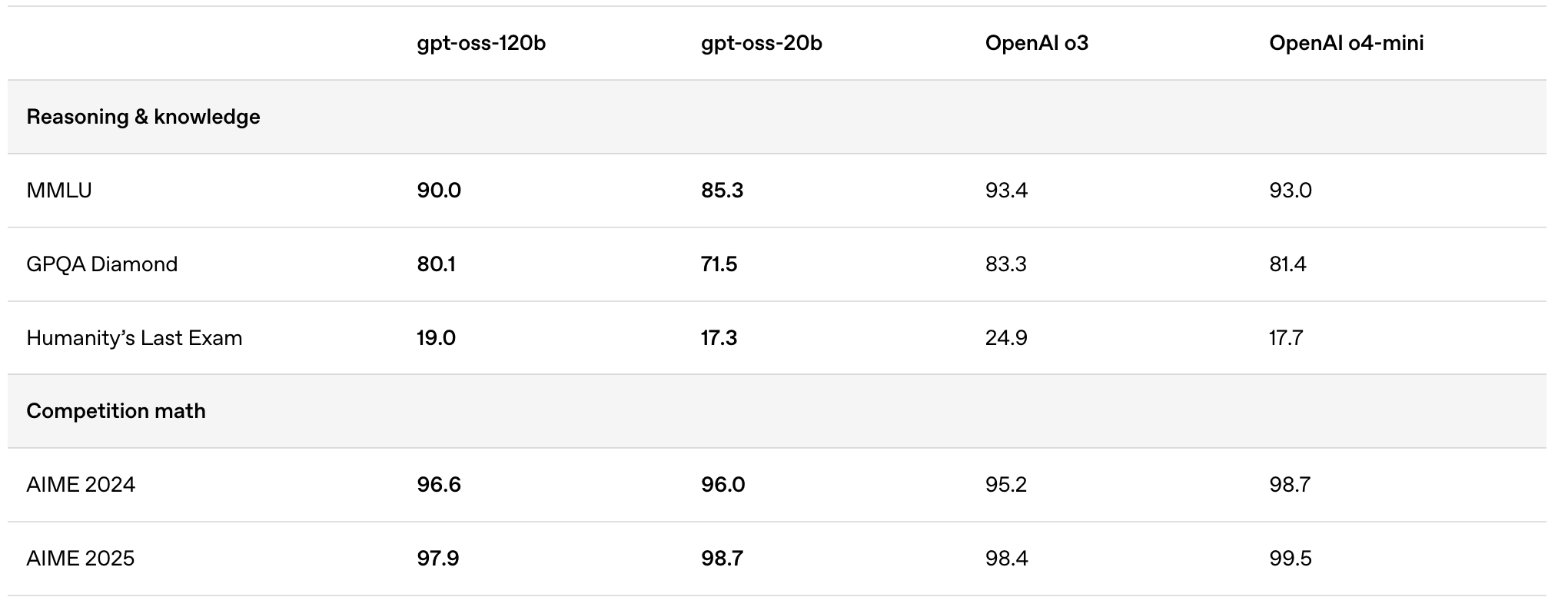
The gpt-oss models employ a Mixture of Experts (MoE) architecture, activating only a subset of parameters per token to enhance efficiency. The gpt-oss-120b model, with 120 billion parameters, activates 5.1 billion per token and can operate on a single 80 GB GPU. The gpt-oss-20b model, with 20 billion parameters, activates 3.6 billion per token and is optimized for devices with just 16 GB of memory, making it suitable for edge devices and local inference.
These models support a context length of up to 128,000 tokens, facilitating the processing of extensive documents. They also incorporate Chain-of-Thought (CoT) reasoning, enhancing their ability to handle complex tasks. The models are released under the Apache 2.0 license, allowing for broad customization and deployment.
In terms of performance, the gpt-oss-120b model achieves near parity with OpenAIs proprietary o4-mini model on core reasoning benchmarks, while the gpt-oss-20b model delivers results comparable to the o3-mini model. Both models demonstrate strong capabilities in tool use, few-shot function calling, and health-related tasks, outperforming some proprietary models in these areas.
Safety is a cornerstone of the gpt-oss models. OpenAI has implemented comprehensive safety training and evaluations, including adversarial fine-tuning, to ensure these models meet high safety standards. This approach aims to provide developers with reliable and secure AI tools.
The release of gpt-oss-120b and gpt-oss-20b represents a significant step in making advanced AI models more accessible and customizable, enabling a wide range of applications across various industries.

When comparing gpt-oss models to other large language models, several factors such as performance benchmarks, architecture, and hardware requirements come into play.
| Model | Parameters | Active Parameters per Token | Context Length | Hardware Requirements | License | Performance Benchmarks |
|---|---|---|---|---|---|---|
| gpt-oss-120b | 120B | 5.1B | 128k tokens | 80 GB GPU | Apache 2.0 | Near parity with o4-mini on reasoning tasks |
| gpt-oss-20b | 20B | 3.6B | 128k tokens | 16 GB memory | Apache 2.0 | Comparable to o3-mini on benchmarks |
| DeepSeek-R1 | 70B | Varies | Varies | 48 GB GPU | MIT | Strong performance in reasoning tasks |
| Llama 3.1 | 70B | Varies | Varies | 45 GB GPU | Llama Community License | General capability |
| Gemma 3 | 27B | Varies | Varies | 46 GB GPU | Google custom license | General capability |
The gpt-oss models stand out for their efficient architecture, allowing them to deliver high performance while being deployable on relatively modest hardware. Their open-source nature under the Apache 2.0 license further enhances their appeal for developers seeking customizable AI solutions.
Usage License
The GPT-OSS models, including GPT-OSS-120B and GPT-OSS-20B, are released under the Apache 2.0 license. This permissive open-source license allows users to freely use, modify, and distribute the models for both commercial and non-commercial purposes. Key provisions of the Apache 2.0 license include:
- Commercial Use: Users are permitted to incorporate GPT-OSS models into commercial products and services without restrictions.
- Modification and Distribution: Users can modify the models and distribute derivative works, provided that proper attribution is given to the original authors.
- Patent Grant: The license includes an explicit grant of patent rights from the contributors to the users.
- Attribution: Users must include the original copyright and license notice in any distributed version of the software and state any significant changes made.
For detailed information, refer to the official Apache 2.0 license text.
Advantages and Disadvantages of Running GPT-OSS Locally
Deploying GPT-OSS models on local hardware offers several benefits and drawbacks:
Advantages
- Privacy: Running models locally ensures that sensitive data remains on-premises, enhancing data security and compliance with privacy regulations.
- Offline Operation: Local deployment allows for uninterrupted use without reliance on an internet connection, ensuring availability in remote or restricted environments.
- Portability: With appropriate hardware, such as a laptop, GPT-OSS models can function without external power sources, providing flexibility for mobile applications.
- Cost Efficiency: Avoiding cloud service fees can lead to significant cost savings, especially for extensive or continuous usage scenarios.
- Customization: Local control enables fine-tuning and optimization of models to meet specific requirements, allowing for tailored performance and functionality.
Disadvantages
- Hardware Requirements: High-performance models like GPT-OSS-120B demand substantial computational resources, necessitating advanced hardware setups that may be costly.
- Maintenance Overhead: Managing and updating local deployments require technical expertise and ongoing maintenance efforts.
- Scalability Limitations: Scaling operations to handle increased workloads can be challenging without the elastic resources available in cloud environments.
- Initial Setup Complexity: Setting up the environment for local deployment can be complex and time-consuming, potentially delaying implementation.
Considering these factors is essential when deciding between local deployment and cloud-based solutions for GPT-OSS models.
 Run gpt-oss with Ollama
Run the gpt-oss model locally with Ollama to work in private, offline and with low latency. Model page: gpt-oss on Ollama.
 Install Ollama on Windows and run gpt-oss
- Install Ollama with Winget:
winget install Ollama.Ollama
- Open PowerShell or Terminal and run the model:
ollama run gpt-oss
Compatible with Windows 10 and Windows 11. Ideal for professional desktops, content creation, and local workflows without internet.
 Install Ollama on MacOS and run gpt-oss
- Install Ollama with Homebrew (Intel or Apple Silicon):
brew install ollama
- Run the model:
ollama run gpt-oss
On macOS Monterey, Ventura and Sonoma, gpt-oss performs very well on Apple Silicon (M1/M2/M3) for writing, development and study totally offline.
 Linux: install Ollama and run gpt-oss
Install the LLM gpt-oss on Ubuntu, Debian, Fedora, Kali Linux, openSUSE, Linux Mint, Pop!_OS, Arch and Manjaro with a single command:
curl -fsSL [https://ollama.com/install.sh](https://ollama.com/install.sh) sh
- Run the model on your distro (Ubuntu/Debian/Fedora/Kali/openSUSE/Mint/Pop!_OS/Arch/Manjaro):
ollama run gpt-oss
Perfect for Linux servers and laptops: automate workflows with scripts, draft content and test prompts without relying on the internet.
 BSD (FreeBSD, OpenBSD, NetBSD): run gpt-oss with Ollama in a container
The simplest way on BSD is to use a container (Docker/Podman) to isolate the environment:
docker run -d --name ollama -p 11434:11434 -v ollama:/root/.ollama ollama/ollama docker exec -it ollama ollama run gpt-oss
Valid for FreeBSD, OpenBSD and NetBSD in labs and security environments with local AI.
How to remove the model in Ollama
ollama rm gpt-oss
Delete the model files to free up disk space when you no longer need it.
Available models and tags
- Model name: gpt-oss
- Tags (Model):
gpt-oss:latest gpt-oss:20b gpt-oss:120b
 Run gpt-oss in LM Studio
LM Studio offers a graphical interface to download and run local models. Download the app according to your system from the official website: LM Studio (official download). Then search for gpt-oss, download and click Run.
Install LM Studio on Windows and run gpt-oss
- Download LM Studio for Windows from lmstudio.ai and install it (compatible with Windows 10 and Windows 11).
- In Models, search for gpt-oss and click Download.
- Start the model with Run to chat locally without connection.
LM Studio on Windows simplifies model management and private sessions for productivity tasks, technical blogging, and prompt testing.
Install LM Studio on MacOS to run gpt-oss
- Download LM Studio for macOS from lmstudio.ai (Intel or Apple Silicon).
- Open the app, search for gpt-oss, download and click Run.
Smooth experience on Monterey, Ventura and Sonoma, with outstanding performance on Apple Silicon chips for creative and technical work without internet.
Install LM Studio on Linux and run gpt-oss
- Download LM Studio (AppImage/package) from lmstudio.ai and follow the instructions for your distro.
- Open the app, search for gpt-oss, download and click Run.
Works on Ubuntu, Debian, Fedora, Kali Linux, openSUSE, Linux Mint, Pop!_OS, Arch and Manjaro, enabling local and private AI sessions for desktops and workstations.
Install LM Studio on BSD and its variants to run gpt-oss
Run LM Studio via compatibility or a container. Once inside the app, search for gpt-oss, download and click Run to start the local session.
In FreeBSD, OpenBSD and NetBSD, it is a practical approach for labs and audits where local AI is a requirement.
How to delete the model in LM Studio
- Go to Models > Installed.
- Find gpt-oss and click Delete to remove the downloaded files.
Hardware Required to Run the LLM gpt-oss
| Model Version | Required Memory | Optimal Memory | Compatible GPUs | Alternative CPU RAM Setup |
|---|---|---|---|---|
| gpt-oss:latest | 16 GB RAM | 32 GB RAM | Consumer GPUs with ≥16 GB VRAM (e.g., NVIDIA RTX 4060 Ti 16GB, RTX 3090, RTX 4090) | 24 GB system RAM (expect significantly slower performance) |
| gpt-oss:20b | 16 GB RAM | 32 GB RAM | Consumer GPUs with ≥16 GB VRAM (e.g., NVIDIA RTX 4060 Ti 16GB, RTX 3090, RTX 4090) | 24 GB system RAM (expect significantly slower performance) |
| gpt-oss:120b | 80 GB RAM | 80 GB RAM | Data-center GPUs (e.g., NVIDIA A100 80GB, H100 80GB) or multiple high-end GPUs in parallel (e.g., 4×24GB GPUs like RTX 3090/4090) | Not recommended due to high resource demands and significantly reduced performance |
Understanding Quantization in Large Language Models (LLMs)
What is Quantization?
Quantization is a model compression technique that reduces the precision of a models parameters, such as weights and activations, from high-precision formats (e.g., 32-bit floating-point) to lower-precision formats (e.g., 8-bit integers). This process decreases the models memory footprint and computational requirements, enabling deployment on devices with limited resources without substantial loss in performance.
How Does Quantization Work?
Quantization can be applied through two primary methods:
- Post-Training Quantization (PTQ): This method involves quantizing a pre-trained model after training completion. The models weights and activations are converted to lower-precision representations, facilitating more efficient inference.
- Quantization-Aware Training (QAT): In this approach, the model is trained with simulated low-precision operations. The training process accounts for the quantization effects, leading to a model that maintains higher accuracy when quantized.
Quantization in gpt-oss Models
For gpt-oss models, quantization plays a crucial role in optimizing performance across different hardware configurations. By reducing the precision of model parameters, quantization allows these models to run efficiently on consumer-grade hardware. For instance, the gpt-oss:20b model can operate on devices with just 16 GB of memory, thanks to optimized quantization techniques. This enables broader accessibility and deployment flexibility for users with varying hardware capabilities.
Optimal Setup for Running gpt-oss Models Locally
To achieve optimal performance when running gpt-oss models locally, consider the following hardware configurations:
- gpt-oss:latest and gpt-oss:20b: A system equipped with a GPU having at least 16 GB of VRAM, such as the NVIDIA RTX 4060 Ti 16GB, RTX 3090, or RTX 4090, along with 32 GB of system RAM, will provide smooth operation and efficient throughput.
- gpt-oss:120b: This model is designed for high-end hardware setups. Utilizing a data-center GPU like the NVIDIA A100 80GB or H100 80GB is ideal. Alternatively, a multi-GPU configuration with four 24 GB GPUs (e.g., RTX 3090/4090) can also support this model, provided the system has at least 80 GB of combined GPU memory and a fast interconnect (e.g., NVLink) for optimal performance.
Minimum Cost-Effective Setup
For users seeking a budget-friendly setup to run gpt-oss models:
- gpt-oss:latest and gpt-oss:20b: A system with a GPU featuring 16 GB of VRAM, such as the NVIDIA RTX 4060 Ti 16GB, coupled with 16 GB of system RAM, can run these models. However, performance may be limited compared to higher-end configurations.
- gpt-oss:120b: Due to its substantial resource requirements, running this model on a cost-effective setup is challenging. Its recommended to utilize cloud-based solutions or access to data-center hardware for this model.
Potential Applications of gpt-oss Models
gpt-oss models can be utilized for a variety of applications, including:
- Content Generation: Producing articles, blogs, and creative writing pieces.
- Code Assistance: Generating code snippets, debugging assistance, and code completion.
- Language Translation: Translating text between different languages with contextual understanding.
- Chatbots and Virtual Assistants: Developing interactive and responsive conversational agents.
- Educational Tools: Creating study guides, summarizing information, and answering queries in educational contexts.
By leveraging the capabilities of gpt-oss models, users can enhance productivity and innovation across various domains.


Be the first to leave a comment